Yesterday I thought it would be great to implement a way how the Combat System is notified about death of participants while a fight is going on. While doing this I implement the death animation for my current prototype enemy, too.
The one thing still missing is the notification about the death which is ironically since this is the essential part of it, but this is just a matter of calling the method I added to the Combat System. I haven’t done it yet since I’m still unsure which layer I want to give control over this.
The death of a combat participant is determined by the character’s health attribute that is attached to it. As mentioned before in another blog post I used GAS (GameplayAbilitySystem) to add attributes to characters in the world.
To easily figure out if the character is still alive I added a IsAlive() method to the base character class in my RPG plugin layer. This is straightforward and easy to use.
float ARPGCharacterBase::GetHealth() const
{
	return this->AttributeSet->GetHealth();
}

bool ARPGCharacterBase::IsAlive() const
{
	return this->GetHealth() > 0.0f;
}
This method is nothing special and it only checks if the health is greater than zero as seen in the code sample.
This method can be called within the animation blueprint for the enemy I use which in return will play the death animation and stay there till the state changes.
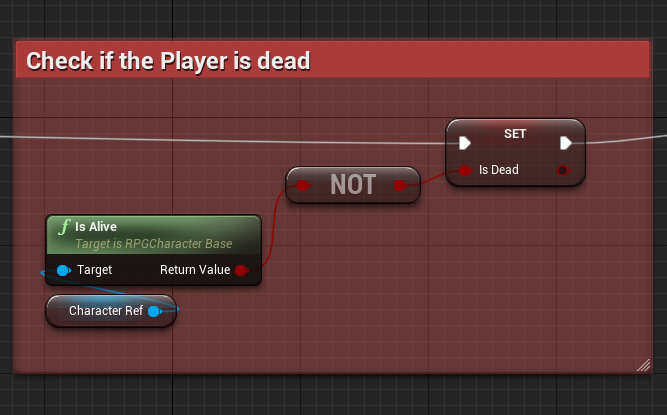
As you can see this is pretty easy as it will only set the IsDead variable to the value of the IsAlive method.
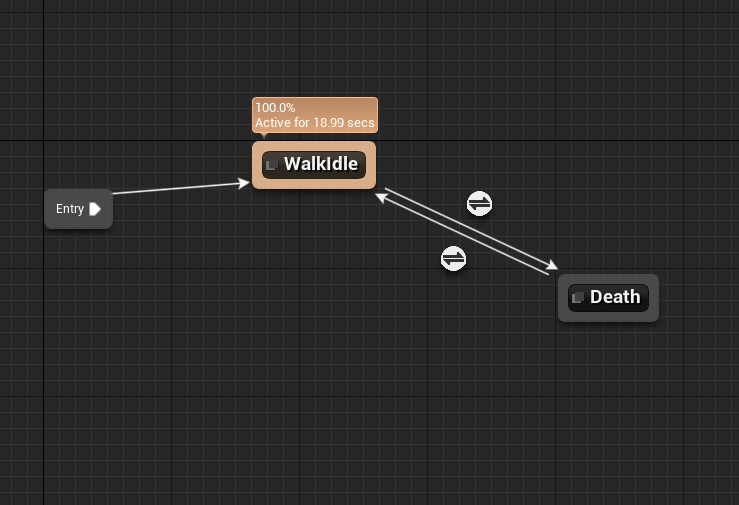
So once the IsDead variable is set to true the graph will transition into the Death state. This is of course at the moment very simple since the enemy cannot do a lot currently.
This is of course isn’t related to the combat system at all. In order to be able to have some hook I can use to notify the Combat System I added a BlueprintNativeEvent OnDeath to the base character class, that will be called once the health is zero.
UFUNCTION(BlueprintNativeEvent)
void OnDeath();
This can of course be used in blueprints or overridden in C++ with custom logic. As you might imagined this will be used to notify the CombatManager about the death of a potential CombatParticipant.
The following method can be called to notify the system about the character’s death.
void UCombatManager::NotifyDeath(ARPGCharacterBase* InCharacter)
{
	if (!bIsInCombat || !InCharacter)
		return;

	auto Participant = this->Participants.FindByPredicate([InCharacter](FCombatParticipant& Participant) { return Participant.Character == InCharacter; });
	if (!Participant)
		return;

	if (Participant->bIsDead)
		return;

	Participant->bIsDead = true;

	bool bEndSequence = false;
	bool bPlayerWon = false;

	if (Participant->bIsEnemy)
	{
		RoundInfo.DeadEnemies++;

		if (RoundInfo.DeadEnemies >= RoundInfo.TotalEnemies)
		{
			bEndSequence = true;
			bPlayerWon = true;
		}
	}
	else
	{
		RoundInfo.DeadPlayers++;

		if (RoundInfo.DeadPlayers >= RoundInfo.TotalPlayerParty) {
			bEndSequence = true;
		}
	}

	if(bEndSequence)
		EndSequence(bPlayerWon);
}
This is the entire method that is used to determine whether or not the „sequence“ is over after the death of the passed Character.
 Game Dev | Blog